
A Video for the Ojambo.com Gimp Save Images For Web article.
Part One of One
Blog
-

Ojambo – Gimp Save Images For Web Video 0072
-
Gimp Save Images For Web
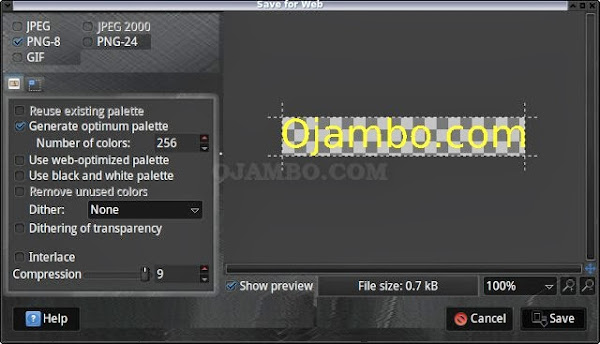
Save Bitmap Images For The Web Using Gimp
A recent game required the creation of several related images. Images were created with Inkscape and exported as Bitmaps. Inkscape saves vectors in the SVG format and exports bitmaps in the PNG format.
Gimp is a bitmap editor that can import SVG files and bitmaps in the PNG format. Some details might be lost during the SVG import which is the reason that PNGs were exported from Inkscape. Gimp allows conversion of different bitmap formats which are more suitable for the web.
-

Ojambo – Gedit Advanced Editor Review Video 0071
A Video for the Ojambo.com Gedit Advanced Editor Review article.
Part One of One
-
Gedit Advanced Editor Review
Gedit Editor Features Review
Gedit is the official text editor for the GNOME Desktop Environment. Gedit is free, open source and cross-platform (Mac, Windows and Linux).
This review is based on features I require of an advanced text editor. A list of required features was created after using different editors. Some features require extensions or plug-ins.
Gedit is a free text editor from https://projects.gnome.org/gedit. There are downloadable packages for Linux, Mac and Windows systems. Gedit can easily be extended by plug-ins to ease application development in different programming languages.
Test Tools
- Test system:
- CPU: Intel(R) i7 2600 @ 3.40GHz.
- Memory: 8GB DDR3.
- Operating System: Debian Jessie Testing 64bit.
- Desktop: Xfce Desktop Environment 4.10.
- Test suite:
- Large file: 1GB human-readable text.
- Regex file: text with word “Gedit” repeated.
- Syntax file: PHP file containing HTML, CSS & JavaScript.
- Media file: Smiley face JPEG file.
- Gedit: Version 3.4.2 64bit
- Test Score:
- Each feature has two parts
- Score of zero indicates missing feature
- A part of a feature is worth a score of 0.5
Three bias elimination steps were utilized. The editor was used for at least three years on different platforms. Attempts were made to get stable plug-ins for missing features. The same editor was compared between the one in the repository, the developers website, and the compiled version if applicable.
Selecting Editor Version
Gedit was installed from the Debian repository. Gedit and its plug-ins do not require GNOME dependencies. Gedit needs re-installation every time I change my distribution.
Gedit was installed in the system folder and was never available for other installed Linux distributions. All plug-ins also require re-installation.
Gedit Multiple Editor View Features
The theme can be native for the editor in terms of the background. Gedit dark and light themes can be created or downloaded. The score for the theme was a perfect 1.0.
Dragging and dropping a text file into the editor opens a new tab. It is not possible to specify the tab location during the drag and drop operation. The score for drag and drop into editor was 0.5.
Opening a very large text file crashed Gedit. Gedit did not remember the last session and it was not possible to edit the large file. The score for opening a large file was 0.0.
Multiple documents can opened in multiple tabs. Tear-off tabs work by opening a new instance of which is handy for multiple monitors. The score for multiple documents was 1.0
Multiple editors can be opened as new tabs with drag options. Every new editor tab can be split either vertically or horizontally use the Split View plugin by Jono Finger but not for the window view. The score for multiple editor view was 0.5.
Creating non-project files is possible. Non-project files can be opened by the drag and drop operation. The score for creating non-project files was a perfect 1.0.
Soft word wrap can be enabled on all documents as text wrapping. Automatic soft wrap for documents is available from the Gedit settings. The score for word wrap was a perfect 1.0.
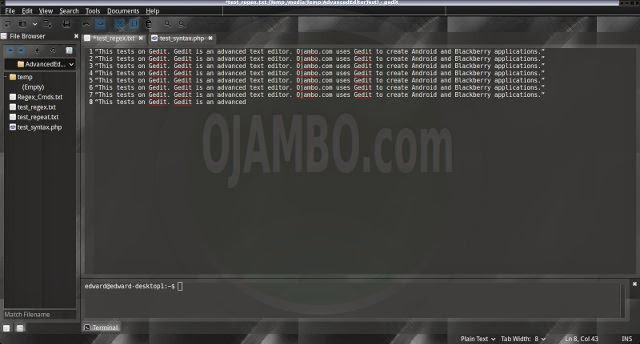
Spell check works as words are typed. Spelling errors are shown in opened documents. The score for spell check was a perfect 1.0.
Word count is available for Gedit. Selection word count is available as part of document statistics. The score for word count was a perfect 1.0.
Go to line can jump to a specified line. It is possible to jump to either the first or last line. The score for go to line is a perfect 1.0.
Indentation can default to user-defined tab stops. Children are not automatically indented. The score for indentation was 0.5.
Fonts can not be dynamically scaled. The system font can be bypassed and a new editor font and size can be set. The score for fonts was 0.5.
Find and replace using regular expressions Regex Search and Replace plugin cannot be utilized for all open documents in the current session. Find and replace will work for the current document or a selection in the current document. The score for find and replacing using regular expressions was 0.5.
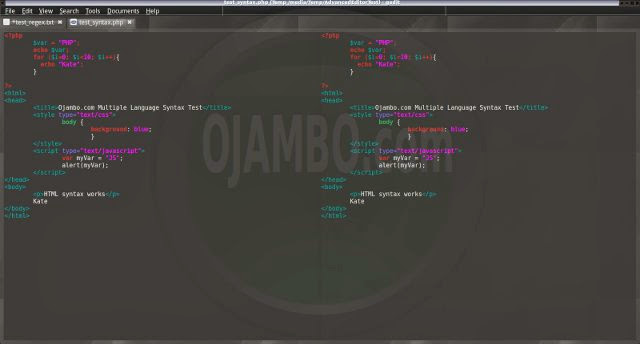
Multiple language syntax highlighting in one file is enabled if the language plug-ins are installed. Each language has code-sensitive syntax colours which can be modified. The score for multiple language syntax highlighting was a perfect 1.0
Code folding does not work for markup languages such as HTML. Code folding also does not work for programming languages such as Java. The score for code folding was 0.0.
Selecting rectangular block per column does not work. Rectangular block selection does not work with word wrap enabled. The score for selecting rectangular block was 0.0.
Multiple selection is available for Gedit but it did not work when enabled. Search multiple selection is not available. The score for multiple selection was 0.0.
Distraction-free mode to hide panes works. Line numbers can be toggled to improve distraction-free mode. The score for distraction-free was a perfect 1.0.
Gedit Distraction-free The file manager required the File system browser plug-in to create and delete folders. Media files cannot be dragged and dropped into the file manager pane. The score for file manager was 0.5.
Terminal requires the Embedded Terminal plugin. The terminal does not follow folder. Terminal can execute system commands. The score for terminal was 0.5.
Results
Gedit is a very powerful text editor. By default, the Gedit editor is missing required features which can be installed by using extensions. For my required features, the Gedit editor scored 62.5% or 6.25 out of 10.
Conclusion
Gedit is a very powerful text editor. Basic editor features are missing in Gedit. Important editor features require Gedit plug-ins. Overall Gedit only scored 6.25 out of 10 for essential text editor features.
Gedit is able to use the system native theme and fonts. Gedit has one of the best tear-off tabs available for any editor. When loading large files, Gedit shows a progress bar with a cancel option.
- Recommendations:
- Look for required plug-ins before deciding to try Gedit.
- Download desired Gedit editor themes.
- Install Gedit from your distribution repository if applicable.
- References:
- Gedit Editor
- Gedit Plugins
- Gedit Themes
-
Inkscape SVG Layers Into Bitmaps Using JessyInk
Save Inkscape Layers As Bitmap Images
A recent game required the creation of several related images. An image was created as a layer in Inkscape. The image was duplicated as a layer and slightly modified in subsequent layers.
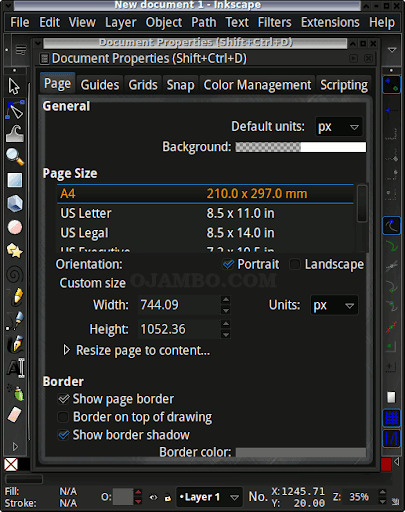
Inkscape can export an area as a bitmap image in PNG format. Exporting individual visible Inkscape layers is tedious. A simpler exporting individual layers exists using the JessyInk plugin.
-

Valens Restaurant
Valens Restaurant Review
Valens Restaurant specializes in global fusion cuisine. A family member suggested trying Valens Restaurant after the first choice was unexpectedly closed for brunch. Valens Restaurant is owned by the owner of Sambuca Grill.
The Valens Restaurant website is easy to navigate. The home page shows the operating hours and the address and phone number are in the header. Reservations for Valens Restaurant can be made by filling out an online form.
