
A Video for the Ojambo.com GVim Advanced Editor Review article.
Part One of One
Blog
-

Ojambo – GVim Advanced Editor Review Video 0075
-
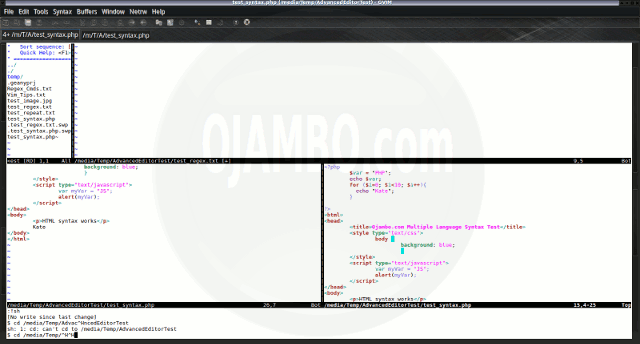
GVim Advanced Editor Review
GVim Editor Features Review
GVim is a lightweight Integrated Development Environment. GVim is free, open source and cross-platform (Mac, Windows and Linux).
This review is based on features I require of an advanced text editor. A list of required features was created after using different editors. Some features require extensions or plug-ins.
GVim is a free text editor from http://www.vim.org. There are downloadable packages for Linux, Mac and Windows systems. GVim can easily be extended by plug-ins to ease application development in different programming languages.
Test Tools
- Test system:
- CPU: Intel(R) i7 2600 @ 3.40GHz.
- Memory: 8GB DDR3.
- Operating System: Debian Jessie Testing 64bit.
- Desktop: Xfce Desktop Environment 4.10.
- Test suite:
- Large file: 1GB human-readable text.
- Regex file: text with word “GVim” repeated.
- Syntax file: PHP file containing HTML, CSS & JavaScript.
- Media file: Smiley face JPEG file.
- GVim: Version 7.3.923 64bit
- Test Score:
- Each feature has two parts
- Score of zero indicates missing feature
- A part of a feature is worth a score of 0.5
Three bias elimination steps were utilized. The editor was used for at least three years on different platforms. Attempts were made to get stable plug-ins for missing features. The same editor was compared between the one in the repository, the developers website, and the compiled version if applicable.
Selecting Editor Version
GVim was installed from the Debian repository. GVim and its plug-ins do require GTK2 runtime dependencies. GVim needs re-installation every time I change my distribution unless built from source.
GVim was installed in the system folder and was never available for other installed Linux distributions. All plug-ins also require re-installation.
GVim Multiple Editor View Features
The theme can be native for the editor in terms of the background. GVim dark and light themes can be created or downloaded. The score for the theme was a perfect 1.0.
Dragging and dropping a text file into the editor opens a new tab or buffer. It is possible to specify the tab location during the drag and drop operation. The score for drag and drop into editor was a perfect 1.0.
Opening a very large text file did not crash GVim. GVim was able to edit the large file. The score for opening a large file was a perfect 1.0.
Multiple documents can opened in multiple tabs or buffers. Tear-off tabs do not work but GVim has a feature to open in new window as a new instance which is handy for multiple monitors. The score for multiple documents was 0.5.
Multiple editors can be opened as new tabs with drag options. Each tab window view can be split either vertically or horizontally as a multiple editor view. The score for multiple editor view was 0.5.
Creating non-project files is possible. Non-project files can be opened by the drag and drop operation. The score for creating non-project files was a perfect 1.0.
Soft word wrap can be enabled on all documents as line wrapping. Automatic soft wrap for documents is available from the GVim settings. The score for word wrap was a perfect 1.0.
Spell check works as words are typed. Spelling errors are shown in opened documents. The score for spell check was a perfect 1.0.
Word count is available for GVim. Selection word count is available as part of word count. The score for word count was a perfect 1.0.
Go to line can jump to a specified line. It is possible to jump to either the first or last line. The score for go to line is a perfect 1.0.
Indentation can default to user-defined tab stops. Children are automatically indented. The score for indentation was a perfect 1.0.
Fonts can be not dynamically scaled with the footzoom plugin by thinca. The system font can be bypassed and a new editor font and size can be set. The score for fonts was 0.5.
Find and replace using regular expressions can be utilized for all open documents in the current session. Find and replace will work for the current document or a selection in the current document. The score for find and replacing using regular expressions was a perfect 1.0.
Multiple language syntax highlighting in one file is enabled if the language plug-ins are installed. Each language has code-sensitive syntax colours which can be modified. The score for multiple language syntax highlighting was a perfect 1.0.
Code folding works for markup languages such as HTML. Code folding also works for programming languages such as Java. The score for code folding was a perfect 1.0.
Selecting rectangular block per column works. Rectangular block selection works with word wrap enabled. The score for selecting rectangular block was a perfect 1.0.
Multiple selection is available for GVim using the multiselect plugin by Hari Krishna Dara. Search multiple selection is not available. The score for multiple selection was 0.5.
Distraction-free mode to hide panes works. Line numbers can be toggled to improve distraction-free mode. The score for distraction-free was a perfect 1.0.
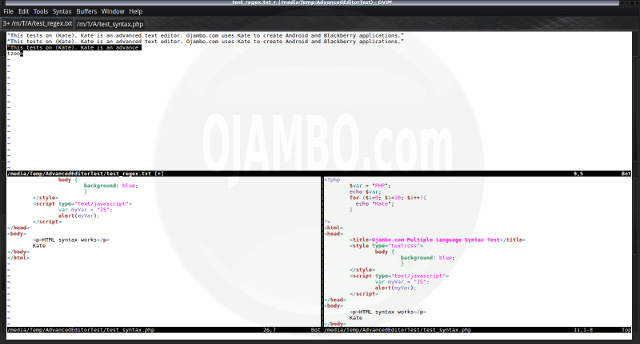
GVim Distraction-free The file manager required the File system browser plug-in to create and delete folders. Media files cannot be dragged and dropped into the file manager pane. The score for file manager was 0.5.
Terminal does not require a plugin. The terminal does not follow folder. Terminal can execute system commands. The score for terminal was 0.5.
Results
GVim is a very powerful text editor. By default, the GVim editor is missing required features which can be installed by using extensions. For my required features, the GVim editor scored 85.0% or 8.50 out of 10.
Conclusion
GVim is a very powerful text editor. Basic editor features are missing in GVim. Important editor features require GVim plug-ins. Overall GVim only scored 8.50 out of 10 for essential text editor features.
GVim is able to use the system native theme and fonts. GVim has one of the best find and replace regular expressions available for any editor. Large files can be opened quickly in GVim.
- Recommendations:
- Look for required plug-ins before deciding to try GVim.
- Download desired GVim editor themes.
- Install GVim from your distribution repository if applicable.
- References:
- GVim Editor
- GVim Plugins
- GVim Themes
-

Ojambo – JavaScript Flip Images Video 0074
A Video for the Ojambo.com JavaScript Flip Images article.
Part One of One
-
JavaScript Flip Images
Flip Images Using JavaScript
A recent game required changing some images dynamically. The most popular method for changing images implementing JavaScript sliders. A simpler method is to use JavaScript to change the Document Object Model (DOM) object.
Images can be loaded dynamically from a remote server. CSS can be used for styling instead of background images. JavaScript can be used to get a flip affect when an image is changed.
-

Ojambo – Geany Advanced Editor Review Video 0073
A Video for the Ojambo.com Geany Advanced Editor Review article.
Part One of One
-
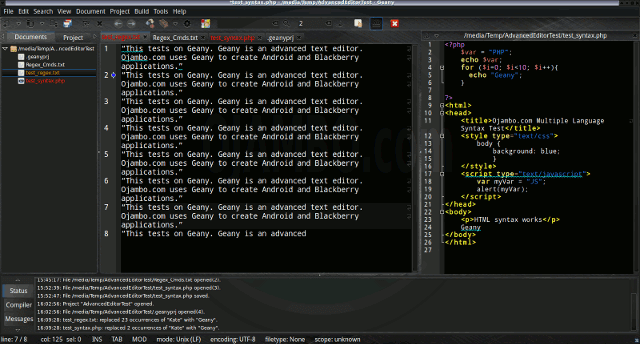
Geany Advanced Editor Review
Geany Editor Features Review
Geany is a lightweight Integrated Development Environment. Geany is free, open source and cross-platform (Mac, Windows and Linux).
This review is based on features I require of an advanced text editor. A list of required features was created after using different editors. Some features require extensions or plug-ins.
Geany is a free text editor from http://www.geany.org. There are downloadable packages for Linux, Mac and Windows systems. Geany can easily be extended by plug-ins to ease application development in different programming languages.
Test Tools
- Test system:
- CPU: Intel(R) i7 2600 @ 3.40GHz.
- Memory: 8GB DDR3.
- Operating System: Debian Jessie Testing 64bit.
- Desktop: Xfce Desktop Environment 4.10.
- Test suite:
- Large file: 1GB human-readable text.
- Regex file: text with word “Geany” repeated.
- Syntax file: PHP file containing HTML, CSS & JavaScript.
- Media file: Smiley face JPEG file.
- Geany: Version 1.23.1 64bit
- Test Score:
- Each feature has two parts
- Score of zero indicates missing feature
- A part of a feature is worth a score of 0.5
Three bias elimination steps were utilized. The editor was used for at least three years on different platforms. Attempts were made to get stable plug-ins for missing features. The same editor was compared between the one in the repository, the developers website, and the compiled version if applicable.
Selecting Editor Version
Geany was installed from the Debian repository. Geany and its plug-ins do require GTK2 runtime dependencies. Geany needs re-installation every time I change my distribution unless built from source.
Geany was installed in the system folder and was never available for other installed Linux distributions. All plug-ins also require re-installation.
Geany Multiple Editor View Features
The theme can be native for the editor in terms of the background. Geany dark and light themes can be created or downloaded. The score for the theme was a perfect 1.0.
Dragging and dropping a text file into the editor opens a new tab. It is not possible to specify the tab location during the drag and drop operation. The score for drag and drop into editor was 0.5.
Opening a very large text file crashed Geany. Geany did not remember the last session and it was not possible to edit the large file. The score for opening a large file was 0.0.
Multiple documents can opened in multiple tabs. Tear-off tabs do not work but Geany has a feature to open in new window as a new instance which is handy for multiple monitors. The score for multiple documents was 0.5.
Multiple editors can be opened as new tabs with drag options. The window view can be split either vertically or horizontally but Geany does not have a multiple editor view. The score for multiple editor view was 0.5.
Creating non-project files is possible. Non-project files can be opened by the drag and drop operation. The score for creating non-project files was a perfect 1.0.
Soft word wrap can be enabled on all documents as line wrapping. Automatic soft wrap for documents is available from the Geany settings. The score for word wrap was a perfect 1.0.
Spell check works as words are typed. Spelling errors are shown in opened documents. The score for spell check was a perfect 1.0.
Word count is available for Geany. Selection word count is available as part of word count. The score for word count was a perfect 1.0.
Go to line can jump to a specified line. It is possible to jump to either the first or last line. The score for go to line is a perfect 1.0.
Indentation can default to user-defined tab stops. Children are automatically indented. The score for indentation was a perfect 1.0.
Fonts can be dynamically scaled. The system font can be bypassed and a new editor font and size can be set. The score for fonts was a perfect 1.0.
Find and replace using regular expressions can be utilized for all open documents in the current session. Find and replace will work for the current document or a selection in the current document. The score for find and replacing using regular expressions was a perfect 1.0.
Multiple language syntax highlighting in one file is enabled if the language plug-ins are installed. Each language has code-sensitive syntax colours which can be modified. The score for multiple language syntax highlighting was a perfect 1.0.
Code folding works for markup languages such as HTML. Code folding also works for programming languages such as Java. The score for code folding was a perfect 1.0.
Selecting rectangular block per column works. Rectangular block selection works with word wrap enabled. The score for selecting rectangular block was a perfect 1.0.
Multiple selection is not available for Geany. Search multiple selection is not available. The score for multiple selection was 0.0.
Distraction-free mode to hide panes works. Line numbers can be toggled to improve distraction-free mode. The score for distraction-free was a perfect 1.0.
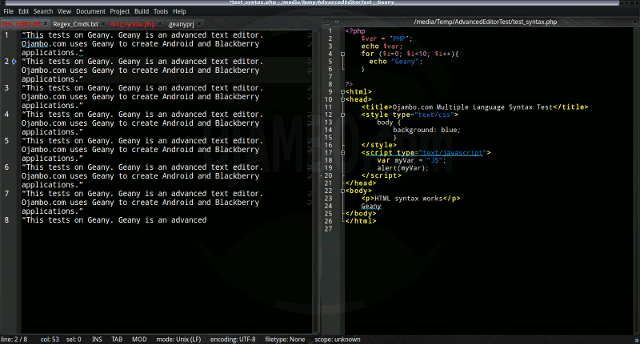
Geany Distraction-free The file manager required the File system browser plug-in to create and delete folders. Media files cannot be dragged and dropped into the file manager pane. The score for file manager was 0.5.
Terminal does not require a plugin. The terminal does follow folder if enabled. Terminal can execute system commands. The score for terminal was a perfect 1.0.
Results
Geany is a very powerful text editor. By default, the Geany editor is missing required features which can be installed by using extensions. For my required features, the Geany editor scored 80.0% or 8.00 out of 10.
Conclusion
Geany is a very powerful text editor. Basic editor features are missing in Geany. Important editor features require Geany plug-ins. Overall Geany only scored 8.00 out of 10 for essential text editor features.
Geany is able to use the system native theme and fonts. Geany has one of the best embedded terminals available for any editor. The find and replace feature for Geany can use all open documents in the current session.
- Recommendations:
- Look for required plug-ins before deciding to try Geany.
- Download desired Geany editor themes.
- Install Geany from your distribution repository if applicable.
- References:
- Geany Editor
- Geany Plugins
- Geany Themes
-

2013 Canadian National Exhibition
2013 Canadian National Exhibition at Exhibition Place
The Canadian National Exhibition or CNE is also known as The Ex. This CNE is an annual event that takes place at Exhibition Place in Toronto Ontario, Canada. The event lasts just over two weeks until the Canadian Labour Monday.
This CNE is a fair consisting of pavilions, exhibits, shows, concerts, rides, games and food. 2003 marks the 135th season for the Ex. Our group decided to attend the Ex in the morning off August 30.
Our meeting was almost called off because rain was predicted for the entire day. The morning was very cloudy and rain was predicted to fall in the afternoon. With no rain falling in the morning, our group decided to meet at the Ex in the afternoon.
Walking Towards Kid’s World At CNE We met at the Kid’s World in the mid-afternoon and spent the entire afternoon on the Kiddie Rides. When I arrived, the weather was still cloudy. The sky cleared 20 minutes later and the weather became very humid. I had to seat down and recover due to severe sun burn to the top of the head.

Seated Photo At CNE After regaining my strength, I took some photos and had fun at the Ex. We had dinner in the Food Building.
The 2003 Canadian national exhibition was great. I am in a position to watch the airshow everyday.
Moving Ferris Wheel at CNE Kiddie Rides Ferris Wheel which two family members declined to ride.

Stationary Ferris Wheel at CNE Kiddie Rides Ferris Wheel waiting for three family members to decamp from ride.

Dizzy Dragon at CNE Kiddie Rides Dizzy Dragon waiting for my turn.