

Compare Files Using Diff
The file comparison utility “diff” outputs differences between two files. In the past, “diff” compared text files. Modern versions of “diff” compare binary files such as audio and video files.
Web designers can use “diff” to quickly compare files. Programmers can use the differences as messages for source control management systems. In this tutorial, “diff” will be used to compare text files.
This tutorial uses the command line tool called “diff”.
- Tools are required:
- Text editor.
- Shell.
- Command line tool “diff”.
Optional Download and install Geany
Geany is required in order to follow this tutorial. For more information about Geany read Ojambo.com Lightweight Programming Editors.
Old.txt file
This is a test
For the Old
By Ojambo.com
To compare via
Diff command
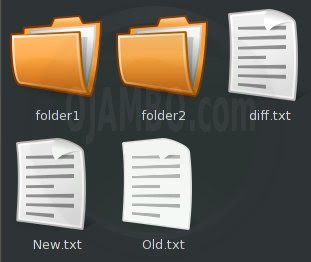
The “Old.txt” file contains text that will be compared using the “diff” command. The “Old.txt” will act as the original content for comparison purposes.
New.txt file
This is a test
For the New
By Ojambo.com
To compare via
Diff command
The “New.txt” file contains text that will be compared using the “diff” command. The “New.txt” will act as the changed content for comparison purposes.
Compare Two Files
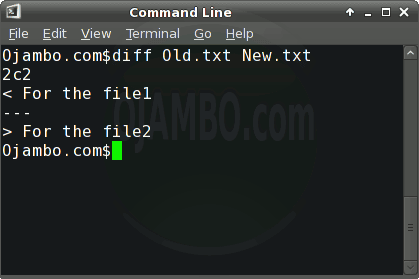
diff Old.txt New.txt
The “diff” command will compare two files and output any changes. The output contains the line numbers of the applicable changed lines.
“diff” output
2c2
< For the New.txt
---
> For the Old.txt
The “2c2” means that line 2 for “Old.txt” is different from line 2 for “New.txt”. Two options are available in order for the two files to be the same. The first is to make line 2 of “Old.txt” the same as line 2 of “New.txt” which is indicated by the less than symbol “<".
The second is to make line 2 of “New.txt” the same as line 2 of “Old.txt” which is indicated by the greater than symbol “>”. The lines that differ are printed with either a preceding greater than or less than symbol.
How to Use:
- Open Command Line
- Determine path to files for comparing.
- Run the “diff” command as “diff original.txt changed.txt”.
Demonstration:
Ojambo.com Diff Compare Files Tutorial
Conclusion:
The file comparison tool “diff” is a command line utility used to output changes between files. The output contains the affected line numbers. The output also shows the content of the affected line numbers preceding a greater than or less than symbol.
The programmer can determine to revert changes based on the line number output. The affected line number output is based on the order in which the “diff” command was used.
- Recommendations:
- Let the original file be the first file used by the “diff” command.
- Use file comparison for changed files.
- Use file comparison to approve changes.
- References:
- Ojambo.com Lightweight Programming Editors.
🚀 Recommended Resources
Disclosure: Some of the links above are referral links. I may earn a commission if you make a purchase at no extra cost to you.