

Running Legacy PHP Applications
Running legacy PHP applications on modern hardware feels like dragging an anchor. Developers waste hours configuring deprecated extensions and conflicting dependencies. Your local environment crashes every time you attempt a simple update. This architectural bottleneck destroys productivity and delays critical client deployments. You need a streamlined container strategy that isolates legacy code safely. OjamboServices solves this exact infrastructure nightmare with rootless containerization.
Deploying Drupal Inside Podman Desktop
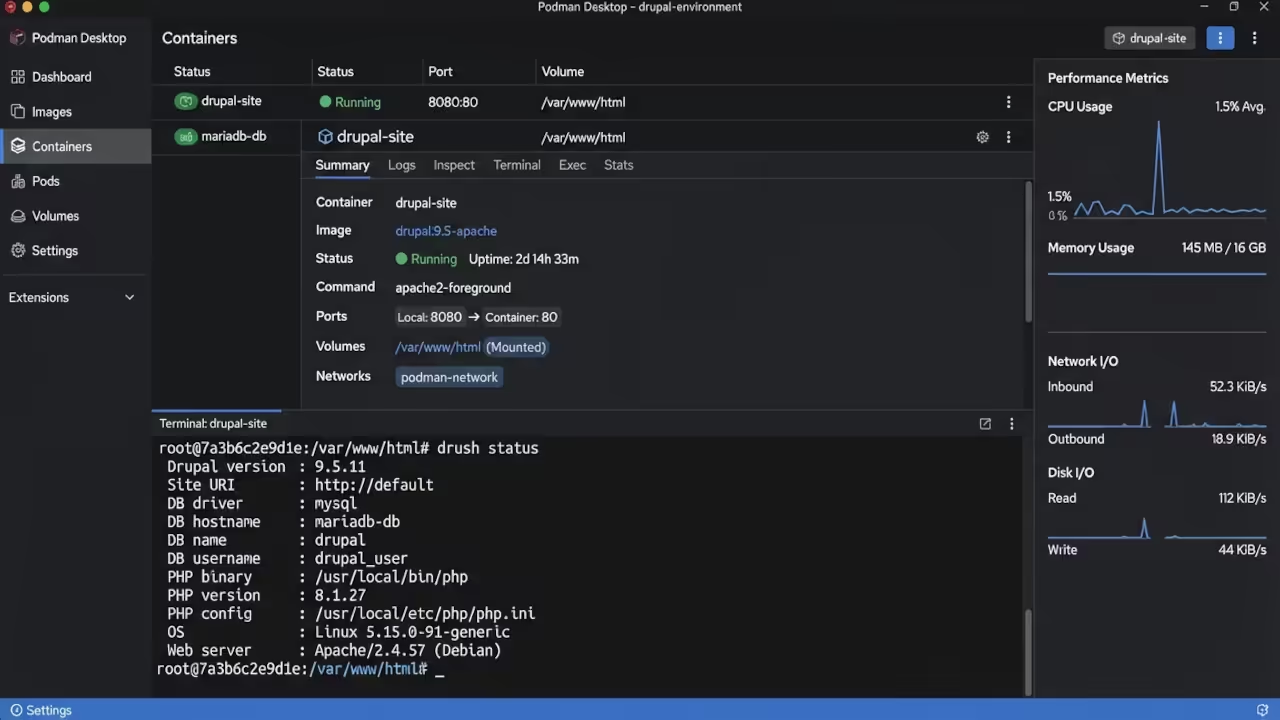
Deploying Drupal inside Podman Desktop transforms your entire development workflow. You finally gain complete control over PHP versions and database states. The system runs silently in the background without draining your resources. You experience instant environment replication across every development machine. Legacy codebases behave predictably inside isolated container boundaries. This reliability eliminates the endless debugging cycles that plague traditional setups. Partner with OjamboServices to modernize your legacy PHP applications today. We specialize in migrating Magento, Zen Cart, and Joomla systems to secure container environments.
Configuring Memory Allocation Strategies
Configuring Podman Desktop for Drupal requires precise memory allocation strategies. You must adjust the container runtime limits to prevent PHP worker crashes. Set the maximum memory limit to exactly four gigabytes for optimal performance. This specific configuration prevents database timeouts during heavy cron job execution. Your container will maintain stable response times even under heavy load. Apply this insider tuning method to every legacy PHP deployment.
Examining Raw Configuration Files
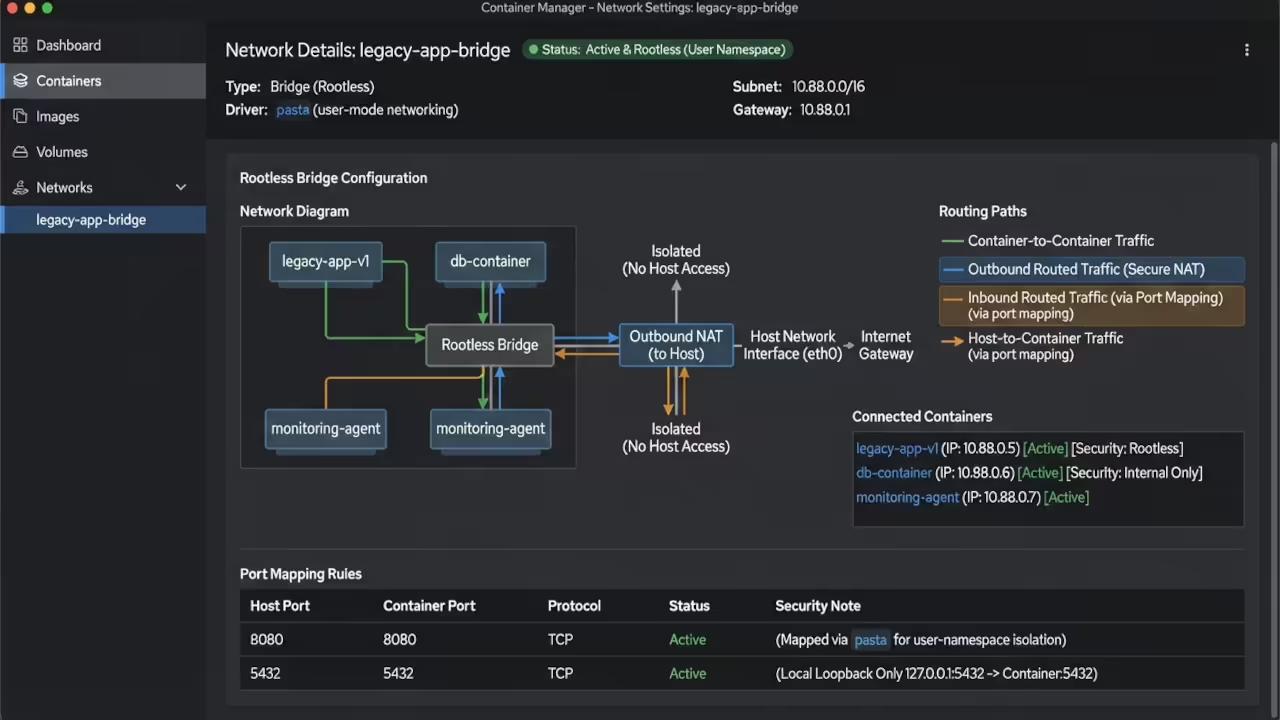
Developers should examine the raw docker-compose configuration before launching the stack. Review the volume mounting paths to ensure persistent data storage. Verify the network bridge settings to isolate the application properly. Adjust the PHP memory limits directly inside the container environment. These manual checks guarantee a stable foundation for complex Drupal sites.
version: '3.8'
services:
drupal:
image: drupal:10-php8.2
ports:
- "8080:80"
volumes:
- ./html:/var/www/html
environment:
- DRUPAL_DATABASE_HOST=db
- DRUPAL_DATABASE_USER=dbuser
- DRUPAL_DATABASE_PASSWORD=dbpass
- DRUPAL_DATABASE_NAME=drupal
depends_on:
- db
db:
image: mysql:8.0
environment:
- MYSQL_ROOT_PASSWORD=rootpass
- MYSQL_DATABASE=drupal
- MYSQL_USER=dbuser
- MYSQL_PASSWORD=dbpass
volumes:
- db_data:/var/lib/mysql
volumes:
db_data:
| Parameter | Description | Value |
|---|---|---|
| Resource Usage | Traditional VM | High Overhead |
| Resource Usage | Podman Desktop | Minimal Footprint |
| Security Model | Host Isolation | Rootless Execution |
| Legacy PHP Support | Manual Compilation | Prebuilt Containers |
| Parameter | Description | Value |
Implementing Secure Network Bridging
Implementing this container strategy connects directly to our previous infrastructure breakthroughs. You can reference the earlier architectural deep dive on secure network bridging. That tutorial explains how to route traffic efficiently between isolated containers. Combining those routing techniques with Podman creates an unbreakable development pipeline. Your legacy applications will finally run with enterprise-grade stability.
Master the Professional Stack
Bridge the gap between legacy code and modern infrastructure using these essential resources. Implement scalable container architectures with proven technical methodologies.
- Books: https://www.amazon.com/stores/Edward-Ojambo/author/B0D94QM76N
- Blueprints: https://ojamboshop.com
- Tutorials: https://ojambo.com/contact
- Consultations: https://ojamboservices.com/contact
🚀 Recommended Resources
Disclosure: Some of the links above are referral links. I may earn a commission if you make a purchase at no extra cost to you.
Comments
2 responses to “Rescue Legacy Drupal Sites With Rootless Containers”
I created this type of implementation as a prototype for Caltrans last summer! Podman was hosted on in-house RHEL servers, so we didn’t have access to Podman Desktop or DDEV on our local Windows laptops (security policy, dontchaknow). One of the big challenges was to get everything configured to work with SELinux restrictions. Did you run into that problem as well, and if you did, how did you solve those issue?
Thanks for posting this. It confirms that my approach was both valid and optimal!
SELinux can be a pain especially when pre-configured with the built-in firewall and security permissions for the server editions. Since i run Fedora locally and on some servers, it comes with sane defaults. I would first take care of the permissions and firewall. Then, tackle SELinux, you might have to put it in permissive mode until you get the settings right, because you also need to test on a reboot. After successfully rebooting, you can make the settings permanent and not need to worry about it until a major upgrade.