

Zen Cart ERROR: date.timezone not set
Sometimes the date.timezone value in not set in the PHP configuration file “php.ini”. Root access is required in order to edit the PHP configuration file. Editing the PHP configuration will cause global changes which might not be desired.
A better option for fixing the date.timezone error is to set timezone value locally. Local values will enable the installation of multiple Zen Cart applications. Each application can use different timezone values.
This tutorial uses PHP and an HTTP Server.
- Tools are required:
- Text editor.
- Folder for web server.
- HTTP Server.
- Browser to view output.
Optional PHP as HTTP Server
In development environmental, PHP can be used as a web server. For more information about PHP Web Server read Ojambo.com PHP Web Development Without Web Server.
Zen Cart Install Error
ERROR: date.timezone not set in php.ini. Please contact your hosting company to set the timezone in the server PHP configuration before continuing.
Edit application_top.php File
<?php
/*
* application_top.php
*
* Copyright 2013 edward <http://ojambo.com>
*
* This program is free software; you can redistribute it and/or modify
* it under the terms of the GNU General Public License as published by
* the Free Software Foundation; either version 2 of the License, or
* (at your option) any later version.
*
* This program is distributed in the hope that it will be useful,
* but WITHOUT ANY WARRANTY; without even the implied warranty of
* MERCHANTABILITY or FITNESS FOR A PARTICULAR PURPOSE. See the
* GNU General Public License for more details.
*
* You should have received a copy of the GNU General Public License
* along with this program; if not, write to the Free Software
* Foundation, Inc., 51 Franklin Street, Fifth Floor, Boston,
* MA 02110-1301, USA.
*
*
*/
ini_set('date.timezone', 'America/Toronto');
?>
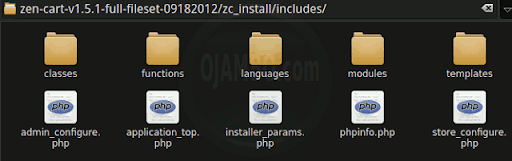
Find your desired timezone such as “America/Toronto”. Add the code to the top of the “application_top.php” file inside the install folder. The “application_top.php” file relative path from the Zen Cart folder is “zc_install/includes/application_top.php”.
How to Use:
- Open Browser
- Enter path (might be IP) of install folder.
- Check the output for errors.
Demonstration:
Ojambo.com PHP ERROR: date.timezone Tutorial
Conclusion:
Every installation of Zen Cart requires a set “date.timezone” value. Setting the timezone globally in “php.ini” might not be desired for other applications. The timezone can be set for each application such as Zen Cart by editing the “application_top.php” file.
- Recommendations:
- Determine your desired timezone first.
- Set the timezone for each individual application locally.
- Do not modify the php.ini file globally.
- References:
- Ojambo.com Lightweight Programming Editors.
- Ojambo.com PHP Web Development Without Web Server.
🚀 Recommended Resources
Disclosure: Some of the links above are referral links. I may earn a commission if you make a purchase at no extra cost to you.
Comments
One response to “Zen Cart Error Date Timezone”