
Stop Waiting. Start Generating.
Text to image generation has become painfully slow on local hardware. Most enthusiasts are stuck waiting minutes per image while cloud services drain their wallets. LTX 2.3 changes everything when paired with stable-diffusion.cpp. This pure C++ inference engine transforms your AMD MI60 into a blazing fast creation station. You will generate studio quality images in seconds instead of minutes.
The Local AI Revolution
The moment you see your first image render locally is pure magic. Your AMD Instinct Mi60 with thirty two gigabytes of VRAM handles the twenty two billion parameter model with ease. The Unsloth Dynamic quantization keeps memory usage manageable while preserving stunning detail. Every generation feels instant and completely private. No cloud dependency. No subscription fees. Just raw creative power running on your own hardware.
Building stable-diffusion.cpp for AMD ROCm
Building stable-diffusion.cpp for your AMD ROCm system requires specific configuration steps. The HipBLAS backend unlocks full GPU acceleration for your MI60. You must clone the repository with all submodules initialized. Then configure CMake with the correct GFX target detected from rocminfo. The Ninja generator provides faster build times on your twelve thread Ryzen processor.
git clone --recursive https://github.com/leejet/stable-diffusion.cpp
cd stable-diffusion.cpp
mkdir build && cd build
export GFX_NAME=$(rocminfo | awk '/ *Name: +gfx[1-9]/ {print $2; exit}')
cmake .. -G "Ninja" -DCMAKE_C_COMPILER=clang -DCMAKE_CXX_COMPILER=clang++ -DSD_HIPBLAS=ON -DCMAKE_BUILD_TYPE=Release -DGPU_TARGETS=$GFX_NAME -DAMDGPU_TARGETS=$GFX_NAME -DCMAKE_BUILD_WITH_INSTALL_RPATH=ON -DCMAKE_POSITION_INDEPENDENT_CODE=ON
cmake --build . --config Release
The Model Ecosystem
The model ecosystem for LTX 2.3 requires several components working together. The diffusion model handles the core image generation process. You need the Gemma three twelve billion parameter text encoder for prompt understanding. The VAE component decodes latent representations into visible pixels. Embedding connectors bridge the text encoder to the diffusion pipeline efficiently.
Generating Images with LTX 2.3
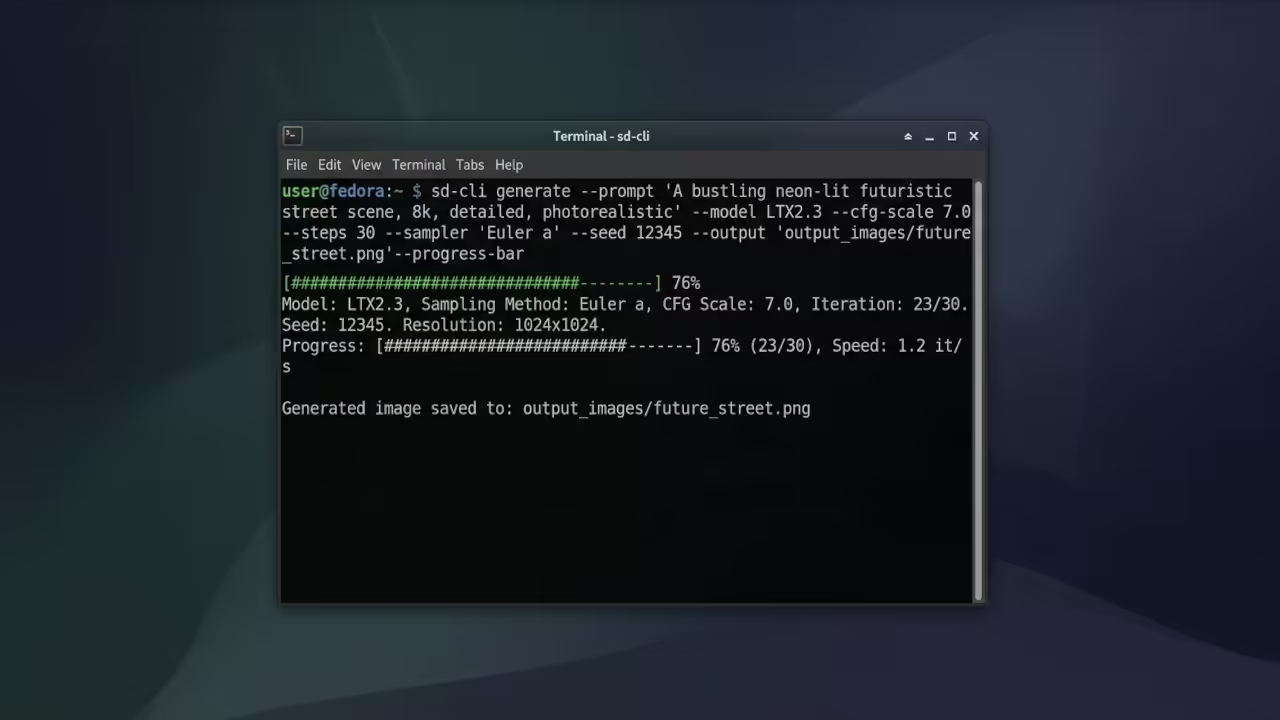
Generating images with LTX 2.3 uses the video generation mode with a single frame output. The command line interface accepts your prompt and configuration parameters directly. Setting video frames to one produces a static image rather than an animation. The flash attention flag significantly improves performance on your MI60 architecture. Offloading to CPU prevents memory bottlenecks during the text encoding phase.
./bin/Release/sd-cli -M vid_gen \
--diffusion-model ltx-2.3-22b-dev-UD-Q4_K_M.gguf \
--vae ltx-2.3-22b-dev_video_vae.safetensors \
--llm gemma-3-12b-it-qat-UD-Q4_K_XL.gguf \
--embeddings-connectors ltx-2.3-22b-dev_embeddings_connectors.safetensors \
-p "a professional product photograph of a mechanical keyboard on dark marble surface" \
--cfg-scale 6.0 \
--sampling-method euler \
-W 1280 -H 720 \
--diffusion-fa \
--offload-to-cpu \
--video-frames 1 \
-o output.webp
The Unsloth Dynamic Quantization Advantage
The Unsloth Dynamic quantization methodology delivers exceptional quality at reduced memory footprints. The Q4_K_M quantization level balances speed and fidelity perfectly for the MI60. Your thirty two gigabytes of VRAM handles this configuration without breaking a sweat. The UD quantization preserves critical attention layers in higher precision automatically. This insider optimization technique is what separates casual users from power enthusiasts.
Hardware Impact on Your Workflow
Hardware selection dramatically impacts your generation workflow and quality ceiling. The AMD Instinct Mi60 provides professional grade compute capability at a reasonable price point. Your Ryzen 5 5600GT handles preprocessing tasks while the GPU dominates the heavy lifting. Storage space becomes critical when managing multiple model files simultaneously. Strategic quantization choices keep your limited storage under control effectively.
| Component | Specification | Impact on T2I |
|---|---|---|
| AMD Instinct Mi60 | 32GB VRAM | Handles 22B parameter models with headroom |
| Ryzen 5 5600GT | 6 Cores 12 Threads | Efficient preprocessing and CPU offload |
| System RAM | 32GB with 4GB iGPU reserved | Smooth multitasking during generation |
| Storage Strategy | Limited space | Q4_K_M quantization saves significant space |
| ROCm Backend | HipBLAS acceleration | Native AMD GPU compute optimization |
| Component | Specification | Impact on T2I |
Master the Professional Stack
Transform your technical knowledge into architectural mastery with these essential resources. Edward Ojambo delivers comprehensive blueprints that bridge theory and real world implementation.
- Books (Technical & Creative): https://www.amazon.com/stores/Edward-Ojambo/author/B0D94QM76N
- Blueprints (DIY Woodworking Projects): https://ojamboshop.com
- Tutorials (Continuous Learning): https://ojambo.com/contact
- Consultations (Custom Apps & Architecture): https://ojamboservices.com/contact
🚀 Recommended Resources
Disclosure: Some of the links above are referral links. I may earn a commission if you make a purchase at no extra cost to you.