
The Problem With Bloated PDF Editors
Most people waste hours fighting with bloated PDF editors just to rearrange a few pages. You open a heavy application and wait for it to load. Then you click through menus that make no sense.
PDF Arranger eliminates every single one of those frustrations. This lightweight open source tool transforms chaotic document management into a visual experience. Built on Python and GTK3 it runs silently in the background while you manipulate entire PDF libraries with your mouse.
The secret weapon underneath is pikepdf, a lightning fast PDF library that handles everything from rotation to cropping without quality loss.
Why PDF Arranger Dominates The Workflow
PDF Arranger arrived at version 1.14.0 in June 2025 and it continues to be the unsung hero of document workflows. Professional editors and researchers rely on this tool daily. Students merge lecture notes without breaking a sweat.
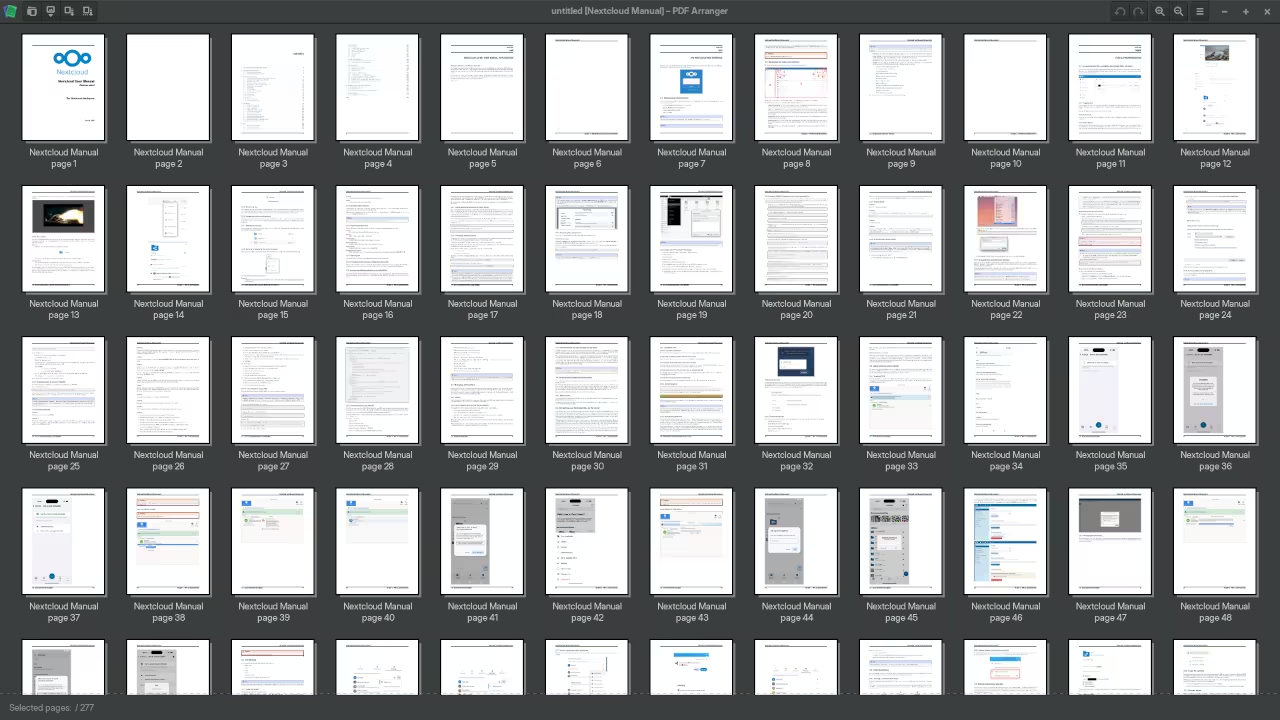
The interface shows thumbnail previews of every page so you can see exactly what you are moving before you commit. No hidden menus. No confusing wizards. Just pure visual control over your documents.
The Discovery Experience
The experience of discovering PDF Arranger feels like finding a missing puzzle piece. You finally understand why your previous workflow was so painful. Loading multiple PDF files into the workspace reveals a clean grid of page thumbnails.
You drag pages between documents as easily as rearranging photos on your phone. Rotating a page takes one click. Cropping margins requires only a visual selection box.
Visit https://ojambo.com/contact for continuous learning tutorials that expand your open source toolkit even further.
Technical Architecture Breakdown
The technical architecture behind PDF Arranger deserves serious attention. The application requires pikepdf version 6 or higher as its backend engine. This dependency matters because pikepdf uses QPDF for low level PDF operations while adding Python bindings for flexibility.
The GTK3 frontend provides the visual layer that makes complex PDF manipulations feel trivial. Installation on modern Linux systems is straightforward through package managers or pip. You can also build from the GitHub repository for the absolute latest features.
Standard Installation
pip install pdfarranger
Development Version From Source
For users who want the development version directly from source the following commands clone and install the latest commit.
git clone https://github.com/pdfarranger/pdfarranger.git
cd pdfarranger
pip install .
Insider Memory Optimization Tip
An insider configuration detail that most users never discover involves the pikepdf memory management settings. When working with massive PDF files containing hundreds of pages you can optimize memory usage by setting the environment variable before launching the application. This prevents the GTK3 interface from stuttering during thumbnail generation on documents with high resolution embedded images.
export PIKESIZE=104857600
pdfarranger
Evolution From PDF Shuffler
PDF Arranger originated as a fork of PDF Shuffler created by Konstantinos Poulios. The project evolved significantly by adopting pikepdf as its core engine and modernizing the GTK3 interface. This transition brought dramatic improvements in speed and reliability compared to the original implementation.
The application now supports advanced operations like page cropping with visual guides and batch rotation of selected pages. Every operation preserves the original PDF structure including bookmarks and metadata whenever possible.
| Tool | Architecture | Backend Engine | Interface | Memory Footprint | License |
|---|---|---|---|---|---|
| PDF Arranger | Python GTK3 | pikepdf QPDF | Visual Drag Drop | Lightweight | GPL |
| Commercial PDF Editors | Proprietary | Custom Engines | Menu Driven | Heavy | Paid License |
| Command Line PDF Tools | Various | poppler qpdf | Terminal Only | Minimal | Open Source |
| Web Based PDF Splitters | JavaScript | PDF JS | Browser Based | Variable | Freemium |
| Tool | Architecture | Backend Engine | Interface | Memory Footprint | License |
The comparison reveals why PDF Arranger dominates the desktop open source category. It combines the precision of command line tools with the accessibility of a visual interface. The lightweight footprint means it runs smoothly even on systems with limited resources.
Master the Professional Stack
PDF Arranger represents the kind of surgical precision tool that separates amateur workflows from professional document architecture. Every optimization in your pipeline matters when you are building systems that scale across hardware and software boundaries.
- Books Technical and Creative: https://www.amazon.com/stores/Edward-Ojambo/author/B0D94QM76N
- Blueprints DIY Woodworking Projects: https://ojamboshop.com
- Tutorials Continuous Learning: https://ojambo.com/contact
- Consultations Custom Apps and Architecture: https://ojamboservices.com/contact
🚀 Recommended Resources
Disclosure: Some of the links above are referral links. I may earn a commission if you make a purchase at no extra cost to you.
Leave a Reply