

Break Free From Local AI Isolation
Your local large language model is trapped in a digital cage. It cannot search the web or read your files. You have a powerful AI running locally with llama.cpp but it remains completely blind to the world around it. The Model Context Protocol exists to solve this exact problem yet most implementations require heavy frameworks that complicate your stack unnecessarily.
There is a better way using only PHP and curl. The PHP MCP Bridge changes everything with zero external dependencies. It is a single file that transforms your local AI into a fully capable agent. Your AI gains the ability to search the internet via SearXNG, read files from your disk, write new files instantly, execute shell commands, and list directory contents.
The Experience Of Connected AI
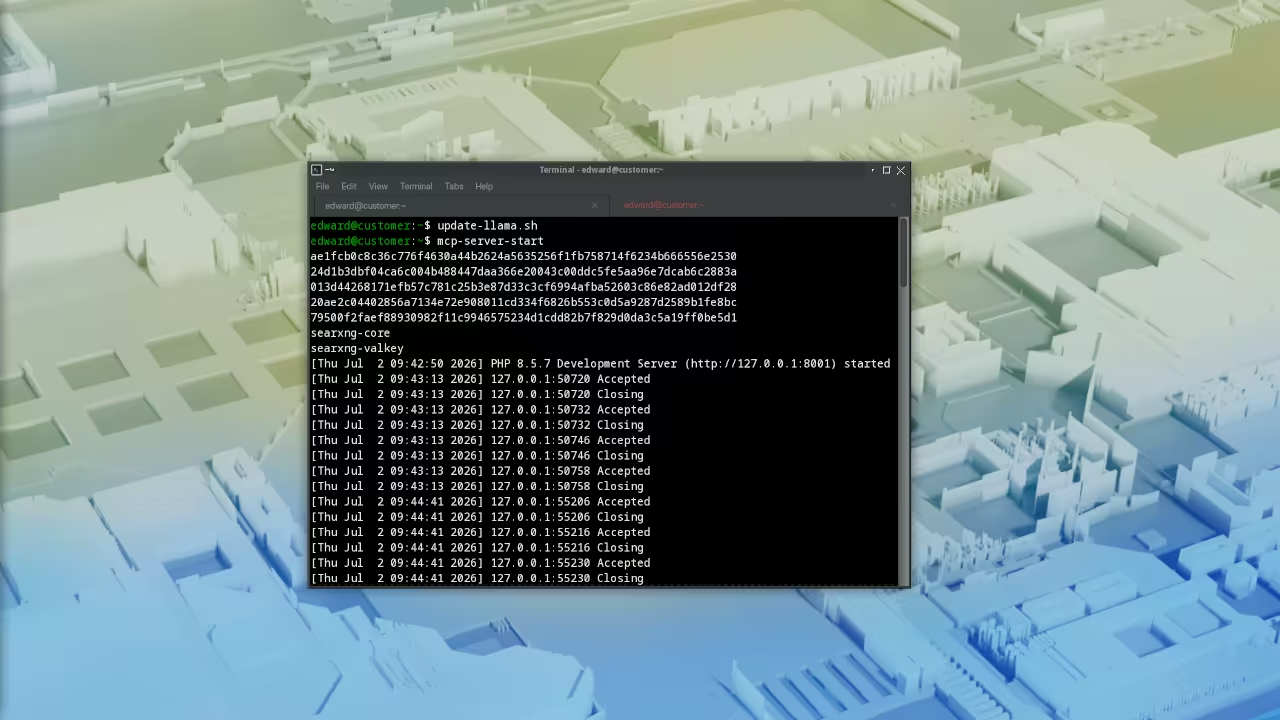
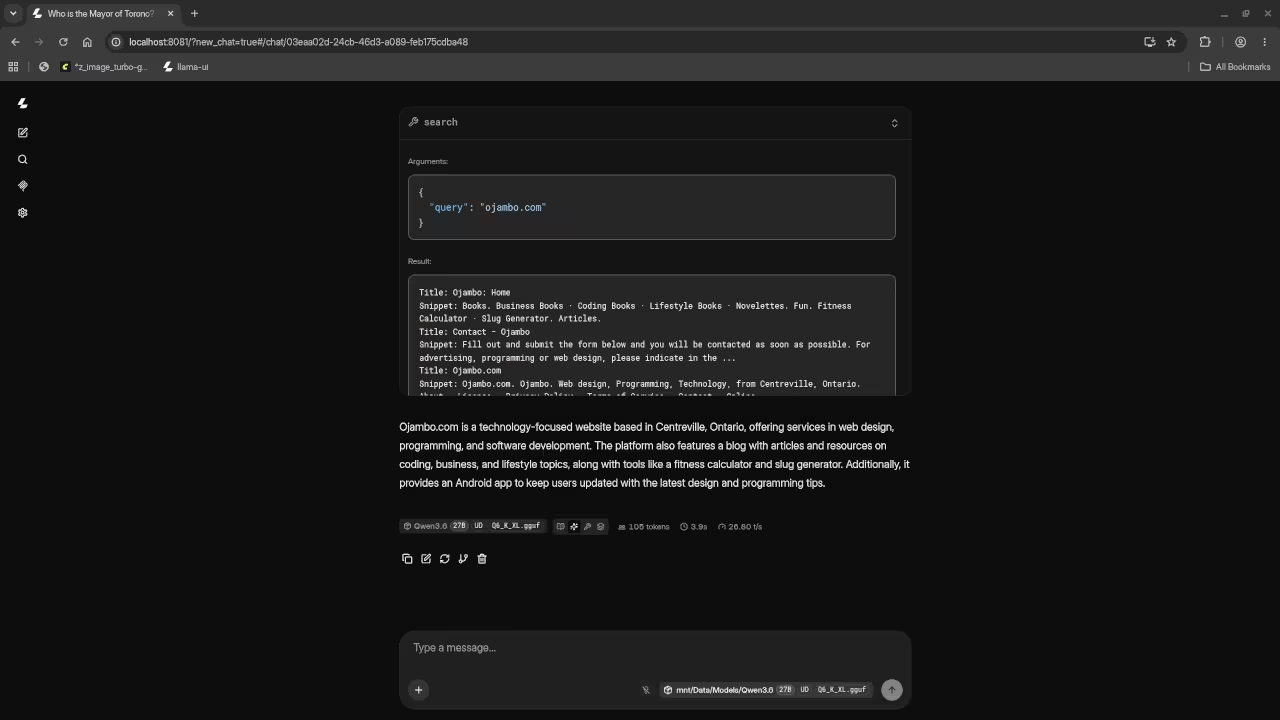
There is a specific feeling when your local AI finally breaks free from isolation. You type a question and watch it search the live internet for answers. You ask it to read a configuration file and it responds with the exact contents. The friction between thought and execution simply disappears.
Your llama.cpp server transforms from a conversation partner into a genuine productivity engine. This is what happens when you strip away complexity and build with surgical precision. Every tool call executes instantly through the lightweight PHP bridge.
How The Bridge Works
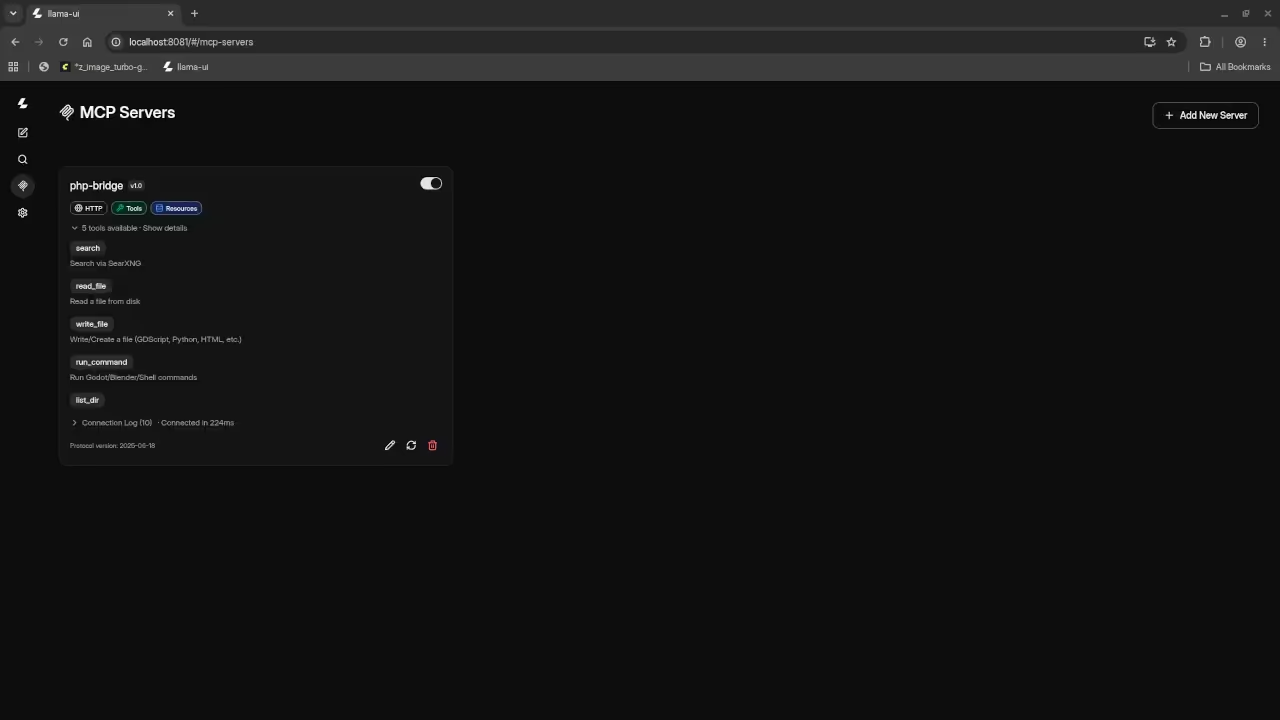
The architecture is elegantly simple at its core. A single PHP file handles everything through JSON RPC version two point zero communication. The bridge implements the Model Context Protocol version two thousand twenty four with full server sent events support for clients like PicoClaw. CORS headers are configured to allow connections from any Web UI without restrictions.
The bridge exposes five powerful tools to your AI system. The search tool connects to a local SearXNG instance running on port eight thousand eighty two and returns the top five results with titles and snippets. The read file tool retrieves contents from any path on your disk. The write file tool creates directories automatically and writes content to any specified location.
Core Bridge Code Structure
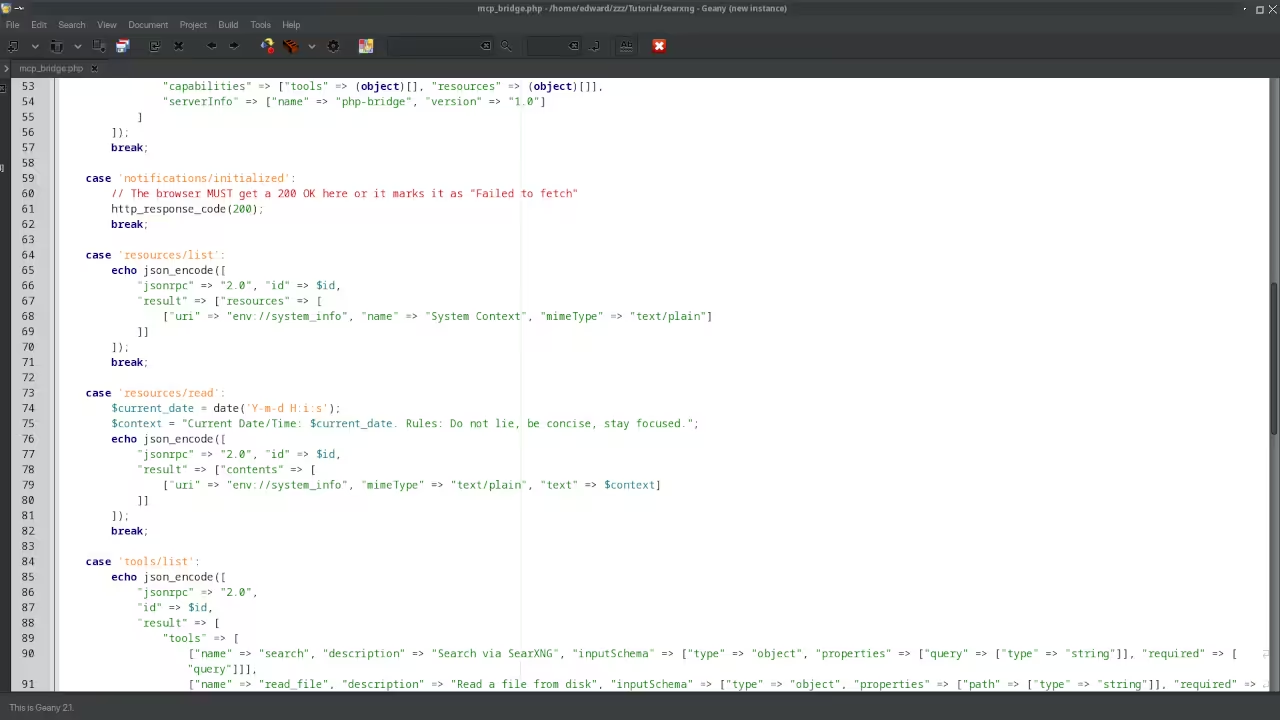
<?php
header("Access-Control-Allow-Origin: *");
header("Access-Control-Allow-Methods: POST, GET, OPTIONS");
header("Access-Control-Allow-Headers: Content-Type, Authorization, X-Requested-With, mcp-protocol-version");
if ($_SERVER['REQUEST_METHOD'] === 'OPTIONS') {
http_response_code(200);
exit;
}
if ($_SERVER['REQUEST_METHOD'] === 'GET') {
header('Content-Type: text/event-stream');
header('Cache-Control: no-cache');
header('Connection: keep-alive');
$postUrl = "http://" . $_SERVER['HTTP_HOST'] . $_SERVER['SCRIPT_NAME'];
echo "event: endpoint\n";
echo "data: " . json_encode($postUrl) . "\n\n";
flush();
exit;
}
$rawData = file_get_contents('php://input');
$input = json_decode($rawData, true);
if (!$input) {
http_response_code(200);
exit;
}
$method = $input['method'] ?? '';
$id = $input['id'] ?? null;
$searxng_url = "http://127.0.0.1:8082/search?format=json&q=";
header('Content-Type: application/json');
switch ($method) {
case 'initialize':
echo json_encode([
"jsonrpc" => "2.0",
"id" => $id,
"result" => [
"protocolVersion" => "2024-11-05",
"capabilities" => ["tools" => (object)[], "resources" => (object)[]],
"serverInfo" => ["name" => "php-bridge", "version" => "1.0"]
]
]);
break;
case 'tools/list':
echo json_encode([
"jsonrpc" => "2.0",
"id" => $id,
"result" => [
"tools" => [
["name" => "search", "description" => "Search via SearXNG", "inputSchema" => ["type" => "object", "properties" => ["query" => ["type" => "string"]], "required" => ["query"]]],
["name" => "read_file", "description" => "Read a file from disk", "inputSchema" => ["type" => "object", "properties" => ["path" => ["type" => "string"]], "required" => ["path"]]],
["name" => "write_file", "description" => "Write or create a file", "inputSchema" => ["type" => "object", "properties" => ["path" => ["type" => "string"], "content" => ["type" => "string"]], "required" => ["path", "content"]]],
["name" => "run_command", "description" => "Run shell commands", "inputSchema" => ["type" => "object", "properties" => ["command" => ["type" => "string"], "cwd" => ["type" => "string"]], "required" => ["command"]]],
["name" => "list_dir", "description" => "List directory contents", "inputSchema" => ["type" => "object", "properties" => ["path" => ["type" => "string"]], "required" => ["path"]]]
]
]
]);
break;
case 'tools/call':
$tool = $input['params']['name'] ?? '';
$args = $input['params']['arguments'] ?? [];
$out = "";
switch ($tool) {
case 'search':
$ch = curl_init($searxng_url . urlencode($args['query'] ?? ''));
curl_setopt($ch, CURLOPT_RETURNTRANSFER, true);
$res = json_decode(curl_exec($ch), true);
curl_close($ch);
if (isset($res['results'])) {
foreach (array_slice($res['results'], 0, 5) as $r) {
$out .= "Title: {$r['title']}\nSnippet: {$r['content']}\n\n";
}
}
break;
case 'read_file':
$out = file_exists($args['path']) ? file_get_contents($args['path']) : "Error: File not found.";
break;
case 'write_file':
$dir = dirname($args['path']);
if (!is_dir($dir)) mkdir($dir, 0755, true);
$out = (file_put_contents($args['path'], $args['content']) !== false) ? "Success: Written to {$args['path']}" : "Error: Write failed.";
break;
case 'run_command':
$cwd = $args['cwd'] ?? __DIR__;
$process = proc_open($args['command'], [1 => ["pipe", "w"], 2 => ["pipe", "w"]], $pipes, $cwd);
if (is_resource($process)) {
$stdout = stream_get_contents($pipes[1]);
$stderr = stream_get_contents($pipes[2]);
fclose($pipes[1]); fclose($pipes[2]);
proc_close($process);
$out = "STDOUT:\n$stdout\n\nSTDERR:\n$stderr";
} else { $out = "Error: Execution failed."; }
break;
case 'list_dir':
$out = is_dir($args['path']) ? implode("\n", scandir($args['path'])) : "Error: Directory not found.";
break;
}
echo json_encode(["jsonrpc" => "2.0", "id" => $id, "result" => ["content" => [["type" => "text", "text" => $out ?: "Done."]], "isError" => false]]);
break;
default:
echo json_encode(["jsonrpc" => "2.0", "id" => $id, "result" => null]);
}
Configuration And Deployment Details
The SearXNG URL is set to localhost port eight thousand eighty two in the source code. You can modify this single variable to point to any SearXNG instance on your network. The server responds on whatever port you specify when launching the PHP built in server. The bridge has been tested successfully with the llama.cpp Web UI, PicoClaw, and OpenClaw without any compatibility issues.
Here is the critical insider detail that most tutorials completely miss. The mcp protocol version header must be explicitly allowed in the CORS Access Control Allow Headers directive. Without this specific header the browser will block the connection and your Web UI will show a failed fetch error. This single header requirement caused days of debugging for early adopters in the community.
Tool Capability Comparison
| Tool | Description | Input Parameters |
|---|---|---|
| search | Search via SearXNG | query string |
| read_file | Read a file from disk | path string |
| write_file | Write or create a file | path and content strings |
| run_command | Execute shell commands | command string and optional cwd |
| list_dir | List directory contents | path string |
| Tool | Description | Input Parameters |
System Context Resource
There is also a system context resource available at the env system info URI. This resource provides the current date and time to your AI along with behavioral rules. The AI receives fresh temporal context with every interaction. This eliminates the common hallucination problem where models guess at current dates or provide outdated information.
Master The Professional Stack
Every complex system begins with a solid architectural foundation. These bridges between AI and reality represent the future of local development workflows.
- Books Technical and Creative: https://www.amazon.com/stores/Edward-Ojambo/author/B0D94QM76N
- Blueprints DIY Woodworking Projects: https://ojamboshop.com
- Tutorials Continuous Learning: https://ojambo.com/contact
- Consultations Custom Apps and Architecture: https://ojamboservices.com/contact
🚀 Recommended Resources
Disclosure: Some of the links above are referral links. I may earn a commission if you make a purchase at no extra cost to you.
Leave a Reply