

Capitalize or change case of text with CSS
Web designers can utilize the CSS text-transform property to control text capitalization. By default, capitalization is set to off and text is rendered as it was input.
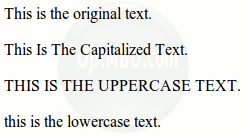
The three cross-browser compatible values for text-transform are capitalize, uppercase and lowercase. Capitalize changes the first character of each word. Uppercase tranforms all characters to uppercase and lowercase transforms all characters to lowercase.
This tutorial uses HTML and CSS.
- Tools are required:
- Text editor.
- Browser to view output.
Optional Download and install Geany
Geany is required in order to follow this tutorial. For more information about Geany read Ojambo.com Lightweight Programming Editors.
HTML-CSS-Text-Transform.html file
<!--
HTML-CSS-Text-Transform.html
Copyright 2012 Edward <http://ojambo.com>
This program is free software; you can redistribute it and/or modify
it under the terms of the GNU General Public License as published by
the Free Software Foundation; either version 2 of the License, or
(at your option) any later version.
This program is distributed in the hope that it will be useful,
but WITHOUT ANY WARRANTY; without even the implied warranty of
MERCHANTABILITY or FITNESS FOR A PARTICULAR PURPOSE. See the
GNU General Public License for more details.
You should have received a copy of the GNU General Public License
along with this program; if not, write to the Free Software
Foundation, Inc., 51 Franklin Street, Fifth Floor, Boston,
MA 02110-1301, USA.
-->
<!DOCTYPE html PUBLIC "-//W3C//DTD XHTML 1.0 Strict//EN"
"http://www.w3.org/TR/xhtml1/DTD/xhtml1-strict.dtd">
<html xmlns="http://www.w3.org/1999/xhtml" xml:lang="en" lang="en">
<head>
<title>Ojambo.com HTML CSS Text Transform</title>
<style type="text/css">
/* Capitalize Text */
p#capitalize { text-transform:capitalize; }
/* UPPERCASE TEXT */
p#uppercase { text-transform:uppercase; }
/* lowercase text */
p#lowercase { text-transform:lowercase; }
</style>
</head>
<body>
<p id="normal">This is the original text.</p>
<p id="capitalize">This is the capitalized text.</p>
<p id="uppercase">This is the uppercase text.</p>
<p id="lowercase">This is the lowercase text.</p>
</body>
</html>
The CSS type is an internal style sheet. The styles for the id (identifiers) are defined in the head section using the style tag. The values for capitalize, uppercase, and lowercase for text-transform change the text to capitalize, uppercase, and lowercase respectively.
How to Use:
- Open Browser
- Load test html file.
- Compare original text to transformed text.
Demonstration:
Ojambo.com CSS Text Transform Tutorial
Conclusion:
The CSS text-transform function can be used to style text. The styled text can be capitalized or changed to either uppercase or lowercase. One possible use by designers for text transformation is to conform to the site theme.
The CSS text-transform property is turned off by default so that text can be displayed as it was input. Text-transform is cross-browser compatible.
- Recommendations:
- Use the text-transform property to make the site consistent.
- Do not over-use text-transform, use it for items such as buttons and menus.
- References:
- Ojambo.com Lightweight Programming Editors.
🚀 Recommended Resources
Disclosure: Some of the links above are referral links. I may earn a commission if you make a purchase at no extra cost to you.
Comments
One response to “CSS Text Transform”