

HTML Change Mouse Cursor Icon
HTML allows changing of the mouse cursor icon. Web designers can create custom icons to personalize websites. The mouse icons do not have dimension limits.
The cursor can be changed when the mouse is place over specific content. In case the image is missing, use the auto parameter to use the default icon.
This tutorial uses the HTML and CSS to change the default mouse icon. The auto parameter is added to the icon as a backup which will be the default icon.
- Tools are required:
- Text editor.
- HTML.
- CSS.
- Optional icon creator
- Browser to view output.
Optional Download and install suitable text editor
Any text editor with regular expression support will work. To select a reviewed lightweight programming editor read the Ojambo.com Lightweight Programming Editors.
Optional Create Mouse Icon in Inkscape
Ojambo.com Create Mouse Icon Tutorial
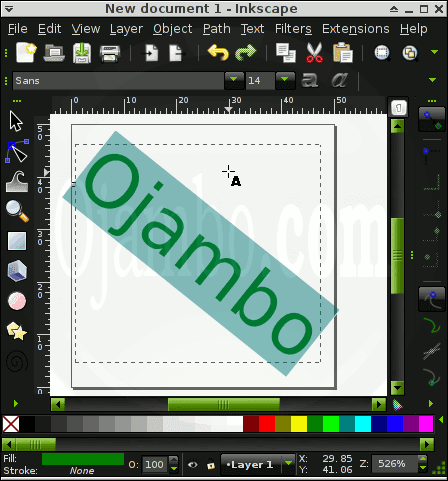
The Inkscape document properties were set to 50px wide by 50px high. The text tool was used to create a text icon. The image was saved as an SVG file, but Inkscape allows saving as PNG files.
Optional Create or Modify Mouse Icon in Gimp
Ojambo.com Create Mouse Icon Tutorial
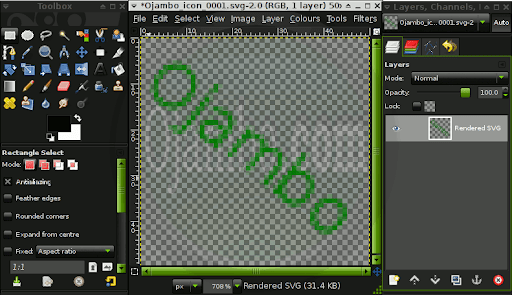
The SVG file was imported into Gimp. The text tool can be used to create a text icon. The image was saved as an GIF file because it was the smallest size.
HTML-Cursor-Icon.html file
<!--
HTML-Cursor-Icon.html
Copyright 2011 Edward <http://ojambo.com>
This program is free software; you can redistribute it and/or modify
it under the terms of the GNU General Public License as published by
the Free Software Foundation; either version 2 of the License, or
(at your option) any later version.
This program is distributed in the hope that it will be useful,
but WITHOUT ANY WARRANTY; without even the implied warranty of
MERCHANTABILITY or FITNESS FOR A PARTICULAR PURPOSE. See the
GNU General Public License for more details.
You should have received a copy of the GNU General Public License
along with this program; if not, write to the Free Software
Foundation, Inc., 51 Franklin Street, Fifth Floor, Boston,
MA 02110-1301, USA.
-->
<!DOCTYPE html PUBLIC "-//W3C//DTD XHTML 1.0 Strict//EN"
"http://www.w3.org/TR/xhtml1/DTD/xhtml1-strict.dtd">
<html xmlns="http://www.w3.org/1999/xhtml" xml:lang="en" lang="en">
<head>
<title>Ojambo.com HTML Change Mouse Cursor Icon</title>
<meta http-equiv="content-type" content="text/html;charset=utf-8" />
<style type="text/css">
div#new-mouse-icon-area {
width: 100px;
height: 100px;
background: Black;
border: 1px solid Green;
cursor:url('HTML-Mouse-Cursor.gif'),auto;
}
</style>
</head>
<body>
<h1>Ojambo.com HTML New Mouse Cursor Tutorial</h1>
<div id="new-mouse-icon-area"></div>
</body>
</html>
The CSS used in an internal style sheet inside the head tags. The cursor is display using the url to specific the icon location.
How to Use:
Run the HTML-Cursor-Icon.html file in your favourite browser.
Mouse over the coloured box to see the new mouse cursor icon.
Demonstration:
Ojambo.com HTML Cursor Icon Tutorial
Conclusion:
A Mouse cursor icon can be created in any graphics editor. A vector file was created in Inkscape and a bitmap copy was optimized in Gimp. CSS used url to load the new icon.
- Recommendations:
- Keep the icon sizes small.
- Optimize images to make them smaller and web-friendly.
- Use auto to utilize the default icon as a fallback method.
🚀 Recommended Resources
Disclosure: Some of the links above are referral links. I may earn a commission if you make a purchase at no extra cost to you.
Comments
One response to “HTML Cursor Icon”